
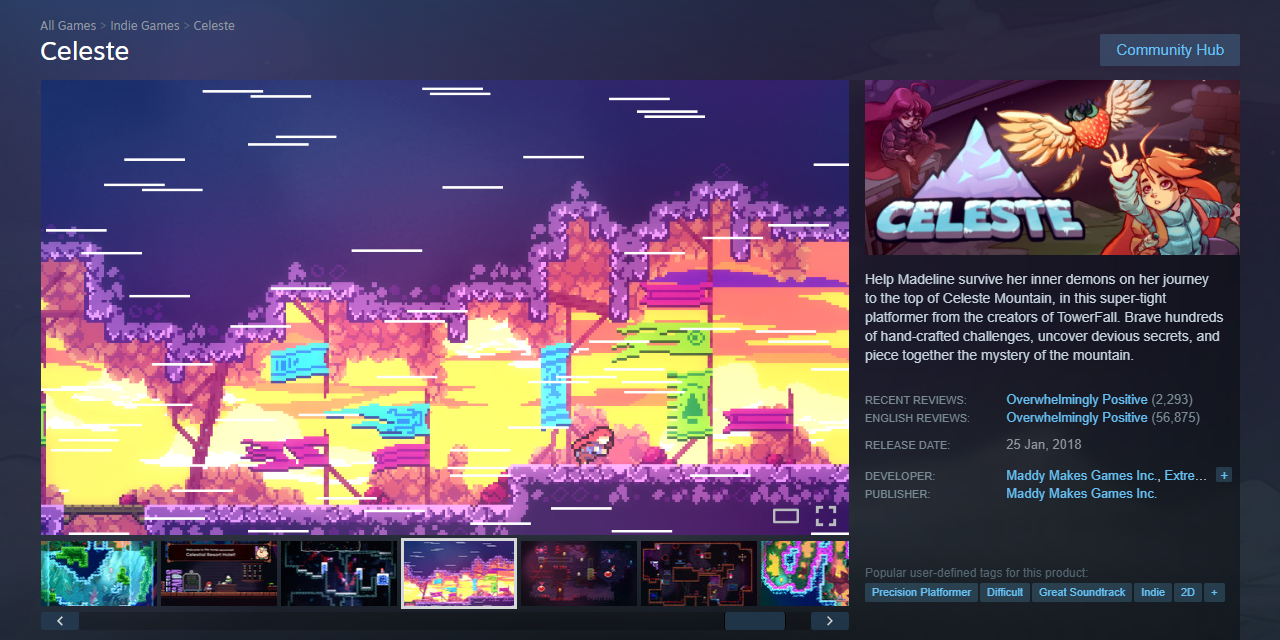
Most Steam store pages fail before a player reads a single word. A weak capsule, a slow-starting trailer, or a description that sounds like a press release — any one of these kills your wishlist rate before a visitor even scrolls. The good news: each element is fixable, and the fixes compound.
Table of Contents
But wishlists aren’t the finish line — they’re inventory. Converting Steam wishlists is really two separate jobs: getting your store page to turn browsers into wishlisters, and then, at launch, turning those wishlists into actual purchases. This guide covers both, including the launch-week mechanics and discount timing Valve itself documents for the second half of that job.
Quick Answer
Converting Steam wishlists happens in two stages. First, optimize your store page — capsule art, trailer, short description, tags, and screenshots — so visitors convert into wishlists in the first place. Second, at launch, convert those wishlists into sales: Steam automatically emails everyone who wishlisted your game the moment it releases, and pairing that email with a modest launch discount (Valve recommends 10-15%, capped at 40%) measurably lifts first-week conversion.
Most lifetime wishlist conversions cluster around two moments — launch week and major storewide sales — not evenly across the calendar. Everything else in this guide (capsule design, tags, discount cadence) exists to make those two moments count.
Start With the Capsule: It Gates Everything Else
Your capsule art is what players see in search results, recommended rows, and the Steam front page. The critical constraint: it must be legible at 120×45 pixels, the size Steam uses in many browse contexts. Design a separate small-capsule treatment — zoom the title in, fill the frame, strip background detail, and test it at actual size before publishing.
Keep the composition simple: one focal character or object, one mood, high contrast against Steam’s blue-gray UI. Avoid review scores, award badges, or promotional text on the capsule — Valve discourages this and it clutters a thumbnail that’s already tiny. Consistency matters too: your capsule should share the same visual language as your screenshots and header art. Once your capsule is solid, your trailer determines whether a visitor stays or bounces.
Trailer, Screenshots, and Short Description
Your trailer’s first five seconds decide whether someone keeps watching — start with active gameplay, not a company logo or a cinematic flyover. Steam auto-generates a six-second microtrailer from your first visible video by taking six 1-second clips from various points throughout it and stitching them together. Because the clips are drawn from across the whole video, your entire trailer needs strong, varied gameplay, not just a strong opening. Aim for 60-90 seconds total at 1920×1080 and 30 or 60fps.
Screenshots work in sequence. The first appears in hover previews and search results — it must show core gameplay, not a title card or concept art. The first three do the heaviest conversion work. Shoot for 8-10 total, mixing gameplay environments, UI in context, and one visually striking moment, and mark at least four as ‘suitable for all ages’ so they’re eligible for Steam’s front-page hover previews.
For the short description — displayed beneath your title and capped at around 300 characters — use the formula: hook + genre + unique mechanic. Name the genre in the first ten words. ‘A precision platformer where each room is a self-contained puzzle’ beats ‘an adventure in a world unlike any other.’ Write like you’re explaining the game to a friend, not pitching investors.
Tags: Fill All 20, Prioritize the Top Five
Steam’s discovery algorithm uses tags to place your game in recommendation feeds and ‘More Like This’ rows. Fill all 20 tag slots, but treat the top five as your most strategic — they display publicly on your page and carry the most algorithmic weight. Favor specific sub-genres over broad ones: ‘Metroidvania’ outperforms ‘Action,’ and ‘Precision Platformer’ outperforms ‘Platformer.’
To find the right tags, identify five to ten successful games in your genre and document their tag overlap. Use those baseline tags, then layer in visual and mood descriptors like ‘Atmospheric’ or ‘Pixel Graphics.’ Avoid wasting top-five slots on ‘Indie’ or ‘Singleplayer’ — nearly every game has those and they add no targeting value. Revisit your tags after launch based on how the community organically tags your game.
How to Convert Steam Wishlists Into Sales at Launch
A wishlist is potential energy, not revenue. The single biggest conversion event is launch day itself: Steam automatically sends a notification email to everyone who has your game wishlisted the moment it goes live, and this window is when the largest share of your lifetime wishlist conversions typically happens. Everything before launch — page optimization, tags, Next Fest, devlogs — is really about maximizing the size of the list that gets that email.
Discounting at launch is optional but effective. Per Valve’s own Steamworks documentation, launch discounts should run 10-15% (capped at 40%) and last between 7 and 14 days, configured before you release. A modest launch discount doesn’t just move price-sensitive buyers — it signals momentum to browsers who land on your page during launch week.
After launch, use the 20% threshold deliberately: any discount of 20% or more automatically triggers a new wishlist notification email to everyone who still has your game listed, re-engaging people who didn’t buy on day one. This is why seasonal Steam sales convert a second (and third) wave of your original wishlist pool long after launch.
Resist discounting too deep too fast. Valve explicitly advises easing into discounts and increasing the level gradually over time — a sample progression might move from roughly 33% to 50% to 66% to 75% or beyond across a year or more, rather than jumping to a steep cut weeks after release. Discounting too aggressively too early undermines the value of your title for full-price buyers and can flatten the notification-driven bump on later sales.
Reviews compound this whole system. Games that hold strong review scores after launch keep converting wishlists at a healthier rate through subsequent sales, because late converters check reviews before buying — so the weeks right after release, when you’re patching launch bugs and responding to feedback, are still part of your wishlist conversion funnel, not an afterthought to it.
Common Mistakes That Kill Wishlist Conversions
Capsule art that turns illegible at small sizes is the most common fixable problem — always test at 120x45px before publishing. Trailers that open with a studio logo, slow drone shot, or story cutscene waste the seconds that determine whether someone stays, and because Steam’s microtrailer pulls six 1-second clips from various points in your video, weak mid-trailer gameplay hurts you twice: it bores live viewers and produces a bland auto-generated microtrailer.
Descriptions that bury the genre three sentences in, or rely on vague adjectives like ‘mysterious’ and ‘epic’ without specifics, give players no reason to wishlist your game over the next one in their queue. Tag errors are less visible but costly: using only five or six tags leaves algorithmic reach on the table, and filling your top five with generic tags like ‘Indie’ wastes your most valuable slots.
On the conversion side, the two most common launch mistakes are the mirror image of each other: launching with zero discount signal and no notification hook, or launching with an oversized discount that trains your audience to wait for the next markdown instead of buying at release. Both blunt the single biggest conversion moment your game gets.
steam wishlist conversion FAQs
How do you convert Steam wishlists into sales?
Most conversion happens in two windows: launch week, when Steam automatically emails everyone who wishlisted your game, and subsequent storewide sales, where a discount of 20% or more re-triggers that notification email. Pairing a modest 10-15% launch discount with a solid store page (capsule, trailer, tags, screenshots) maximizes conversion in that first window.
What discount should I use when my Steam game launches?
Valve recommends a launch discount of 10-15%, capped at 40%, running for 7-14 days and set up before release through Steamworks. This is a light discount rather than a deep one — the goal is to add momentum during launch week, not to compress your long-term pricing.
How much should I discount my Steam game after launch?
Valve advises easing into deeper discounts gradually rather than jumping straight to a steep cut. A typical staircase moves from around a third off, to half off, to two-thirds off, to three-quarters off or more over the course of a year or longer, with each step timed to a sale event or content update to re-notify wishlisters.
How early should I put up a Steam Coming Soon page?
A Coming Soon page carries no penalty for being live long before launch. Wishlists earned well in advance still convert at launch, so list early, participate in Steam Next Fest if eligible, and update your page regularly with devlogs or GIFs to stay visible in the algorithm.
How many screenshots do I need on my Steam page?
Aim for 8-10 screenshots, with the first three doing the heaviest conversion work — they should show core gameplay, not title cards or concept art. Mark at least four as ‘suitable for all ages’ so they’re eligible for Steam’s front-page hover previews.
How does Steam generate the microtrailer for my game?
Steam auto-generates a six-second microtrailer by pulling six 1-second clips from various points across your first visible trailer video and stitching them together. Because the clips are drawn from the whole video, strong gameplay needs to run throughout, not just in the opening seconds.
Build It With GTStudios
Need help with your website, app, or small-business tech? GTStudios builds web, apps, and software for small businesses. See how GTStudios can help.