
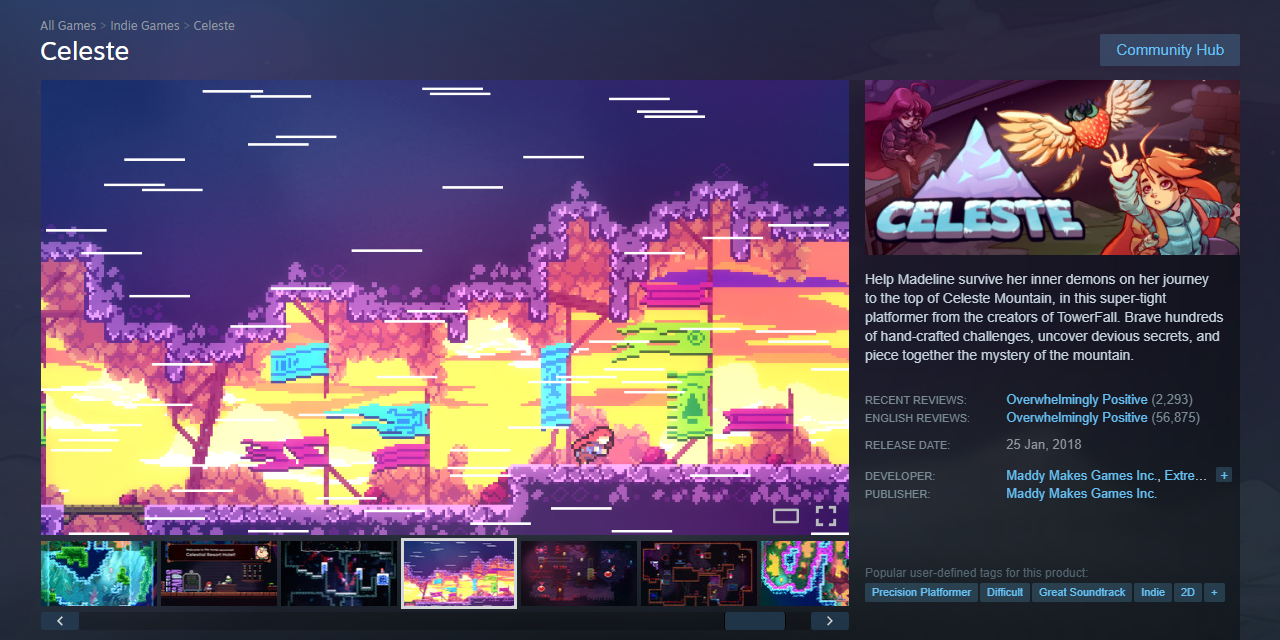
Most Steam store pages fail before a player reads a single word. A weak capsule, a slow-starting trailer, or a description that sounds like a press release — any one of these kills your wishlist rate before a visitor even scrolls. The good news: each element is fixable, and the fixes compound.
Table of Contents
This guide covers the five levers that actually move your Steam wishlist conversion: capsule art, short description, tags, trailer, and screenshots. Get all five right and you give Steam’s algorithm the signal it needs to keep showing your game to the right players.
Quick Answer
Lead with gameplay in your trailer’s first five seconds, name your genre in the first ten words of your short description, fill all 20 tag slots with specific sub-genres, design your capsule to be readable at 120×45 pixels, and put core gameplay in your first three screenshots. Get these five elements right and you push toward the top of the typical Steam wishlist conversion range.
Start With the Capsule: It Gates Everything Else
Your capsule art is what players see in search results, recommended rows, and the Steam front page. The critical constraint: it must be legible at 120×45 pixels, the size Steam uses in many browse contexts. Design a separate small-capsule treatment — zoom the title in, fill the frame, strip background detail, and test it at actual size before publishing.
Keep the composition simple: one focal character or object, one mood, high contrast against Steam’s blue-gray UI. Avoid review scores, award badges, or promotional text on the capsule — Valve discourages this and it clutters a thumbnail that’s already tiny. Consistency matters too: your capsule should share the same visual language as your screenshots and header art. Once your capsule is solid, your trailer determines whether a visitor stays or bounces.
Trailer, Screenshots, and Short Description
Your trailer’s first five seconds decide whether someone keeps watching — start with active gameplay, not a company logo or a cinematic flyover. Steam auto-generates a six-second microtrailer from your first visible video by taking six 1-second clips from various points throughout it and stitching them together. Because the clips are drawn from across the whole video, your entire trailer needs strong, varied gameplay — not just a strong opening. Aim for 60–90 seconds total at 1920×1080 and 30 or 60fps.
Screenshots work in sequence. The first screenshot appears in hover previews and search results — it must show core gameplay, not a title card or concept art. The first three screenshots do the heaviest conversion work; audit data shows a meaningful share of visitors drop off when those three are weak. Shoot for 8–10 total, mixing gameplay environments, UI in context, and one visually striking moment. Mark at least four screenshots as ‘suitable for all ages’ to appear in Steam’s front-page hover previews.
For the short description — displayed beneath your title and capped at around 300 characters — use the formula: hook + genre + unique mechanic. Name the genre in the first ten words. ‘A precision platformer where each room is a self-contained puzzle’ beats ‘an adventure in a world unlike any other.’ Write like you’re explaining the game to a friend, not pitching investors. Every word should help a player decide whether this is for them.
Tags: Fill All 20, Prioritize the Top Five
Steam’s discovery algorithm uses tags to place your game in recommendation feeds and ‘More Like This’ rows. Fill all 20 tag slots, but treat the top five as your most strategic — they display publicly on your page and carry the most algorithmic weight. Favor specific sub-genres over broad ones: ‘Metroidvania’ outperforms ‘Action,’ and ‘Precision Platformer’ outperforms ‘Platformer.’
To find the right tags, identify five to ten successful games in your genre and document their tag overlap. Use those baseline tags, then layer in visual and mood descriptors like ‘Atmospheric’ or ‘Pixel Graphics.’ Avoid wasting top-five slots on ‘Indie’ or ‘Singleplayer’ — nearly every game has those and they add no targeting value. Revisit your tags after launch based on how the community organically tags your game.
On timing: a Coming Soon page carries no penalty for being live long before launch. Wishlists earned well in advance of launch still convert strongly on release day. List early, participate in Steam Next Fest if eligible, and update your page regularly with devlogs or GIFs to stay visible in the algorithm.
Common Mistakes That Kill Wishlist Conversions
Capsule art that turns illegible at small sizes is the most common fixable problem — always test at 120x45px before publishing. Trailers that open with a studio logo, slow drone shot, or story cutscene waste the seconds that determine whether someone stays. Because Steam’s microtrailer pulls six 1-second clips from various points in your video, weak mid-trailer gameplay hurts you twice: it bores live viewers and produces a bland auto-generated microtrailer. Descriptions that bury the genre three sentences in, or rely on vague adjectives like ‘mysterious’ and ‘epic’ without specifics, give players no reason to wishlist your game over the next one in their queue.
Tag errors are less visible but costly: using only five or six tags leaves algorithmic reach on the table, and filling top positions with ‘Indie’ or ‘Action’ puts your game in the noisiest possible pool instead of a specific niche. On discounts: Steam only sends wishlist notification emails for discounts of 20% or more — a 15% launch sale generates no email to your wishlist audience, which is often your best launch-week buyer pool.
Finally, store page optimization is a multiplier, not a miracle. A polished page cannot manufacture player interest that doesn’t exist — but when genuine demand is there, even modest improvements to these five elements compound into meaningfully higher conversion rates and more algorithmic support from Steam.
Explore more: Game Development guides.
Steam store page optimization FAQs
How early should I put up a Steam Coming Soon page?
As early as you have a solid capsule, short description, and at least one trailer. Wishlists earned well before launch still convert strongly on release day — there is no penalty for going up early. Steam Next Fest participation also requires a published page, making early listing especially important for indie developers.
How many screenshots do I need on my Steam page?
Aim for 8–10 screenshots. The first three carry the most conversion weight and appear in hover previews and search results — lead with active gameplay, not title cards or concept art. Mark at least four screenshots as ‘suitable for all ages’ so they are eligible to appear in Steam front-page hover previews.
How does Steam generate the microtrailer for my game?
Steam automatically generates a six-second microtrailer from the first visible video on your store page by taking six 1-second clips from various points throughout the video and stitching them together. You cannot customize which clips are selected, so the best approach is to ensure your entire trailer is filled with strong, varied gameplay footage — not just the opening.
Build It With GTStudios
Need help shipping your app, game, or small-business tech? GTStudios builds web, apps, and games. See how GTStudios can help.
Photo: Website layout: Valve CorporationGame cover and screenshots: Maddy Makes Games / Public domain, via Wikimedia Commons.