
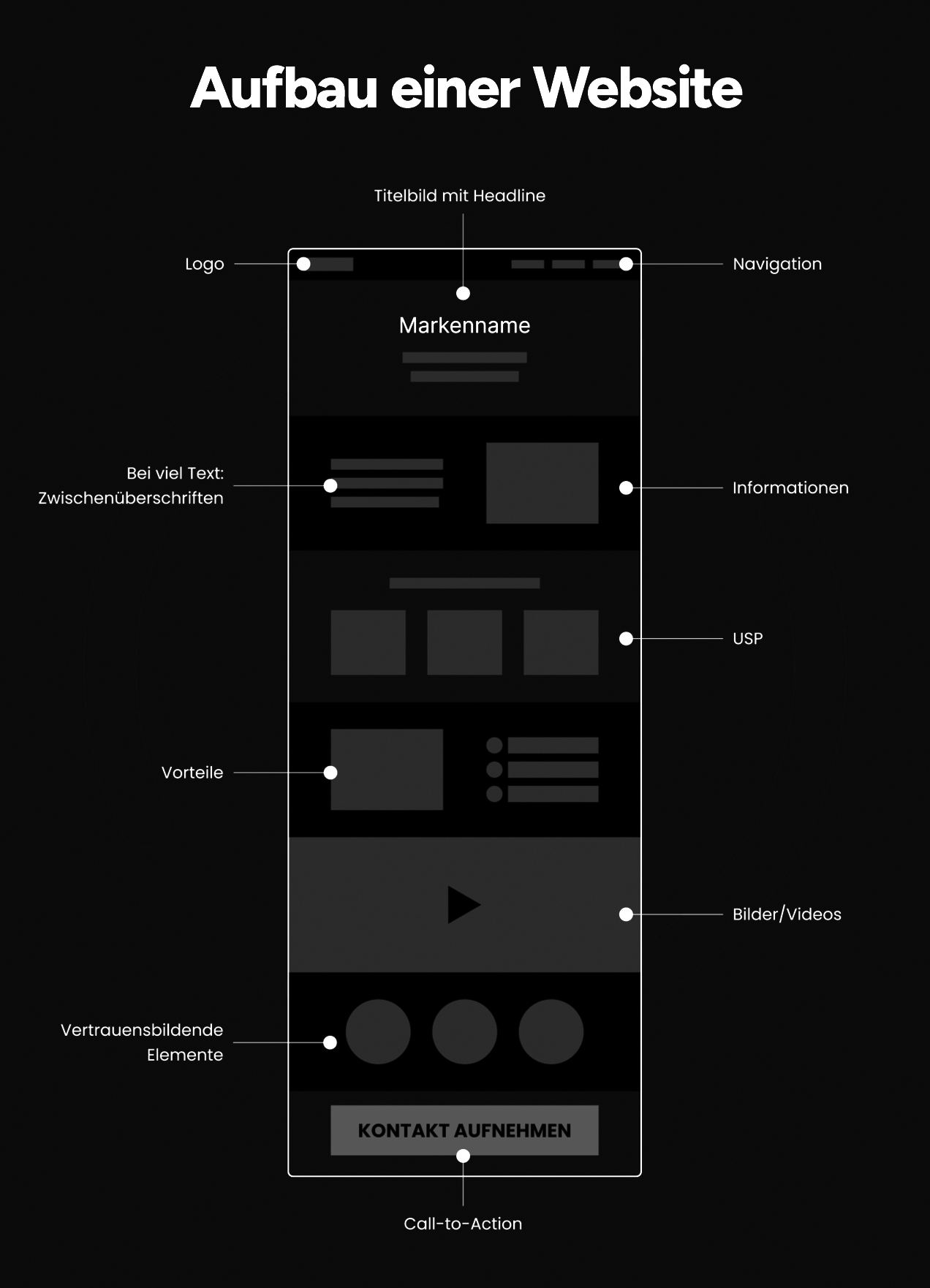
If you’re building or rebuilding a website for your business, the hardest part often isn’t the design — it’s figuring out what pages you actually need. Too few pages and visitors can’t find what they’re looking for; too many and you waste time maintaining content nobody reads.
Table of Contents
This guide breaks down the core pages nearly every small business site should have, what belongs on each one, and a few optional pages worth adding as you grow. Whether you’re a service provider, a local shop, or a solo consultant, this list will give you a solid starting structure.

Quick Answer
At minimum, a small business website needs a Home page, an About page, a Services or Products page, a Contact page, and a Privacy Policy (plus Terms of Service if you sell online or collect customer data). Most small business sites do well starting with somewhere between 5 and 10 pages total, then adding a blog, FAQ, or testimonials page as the business grows.
The Core Pages, One by One
Home page. This is your first impression and traffic hub, so it needs to answer three questions fast: what do you do, who do you do it for, and what should the visitor do next. Include a short description of your main product or service, a real photo (not generic stock art if you can avoid it), and a clear call-to-action button like ‘Get a Quote’ or ‘Book a Consultation.’ The homepage should also link out to your other key pages so visitors can dig deeper.
About page. This is consistently one of the most-visited pages on any small business site, because people want to know who they’re dealing with before they buy or hire. Cover your story, your mission, and the people behind the business. A photo of you or your team goes a long way toward building trust, especially for local and service-based businesses.
Services or Products page. This is where you explain, in plain language, what you sell and why it’s worth choosing you. Break it into clear categories rather than one long wall of text, describe the benefit (not just the feature), and include pricing or a pricing range if your industry supports it. If you offer several distinct services, consider a dedicated subpage for each so people searching for a specific service can land directly on the relevant content.
Contact page. Make it effortless to reach you: phone number, email, physical address, and hours of operation, plus a simple contact form with as few required fields as possible. If you have a physical location, embed a map. Many businesses also repeat their phone number and address in the site footer so it’s visible from every page, not just the contact page.
Legal pages. A Privacy Policy explaining how you collect and use visitor data is standard practice, and it’s required in many jurisdictions if you use analytics, cookies, or collect any personal information through forms. If you sell products or take payments online, add Terms of Service (or Terms and Conditions) as well.
Pages Worth Adding as You Grow
Once the core pages are solid, a few additions can meaningfully improve trust and search visibility. A Testimonials or Reviews page (or section) gives potential customers social proof from people who’ve already worked with you. An FAQ page reduces repetitive customer-service questions and can also help pages rank for the specific questions people search. A Blog gives you a place to publish helpful, industry-relevant content over time, which supports SEO and gives you something to share on social media. And if your business serves multiple cities or regions, dedicated Location pages for each area you serve can help you show up in local search results.
Not every business needs every one of these right away. Start with the core five, get them right, and add the rest as you have the content and time to maintain them properly — a thin, outdated page can hurt more than having no page at all.
Tips / Common Mistakes
Don’t bury your contact information. Visitors shouldn’t have to hunt through menus to find your phone number — put it in the header or footer on every page.
Don’t let the About page become an afterthought. It’s one of the most-read pages on the site, so give it the same care you’d give the homepage.
Don’t skip mobile testing. Most visitors will view your site on a phone, so check that every page — especially forms and menus — works cleanly on a small screen before you launch.
Don’t publish a page with no clear next step. Every page should point the visitor toward a call-to-action, whether that’s calling, filling out a form, or browsing services.
Don’t treat the legal pages as optional boilerplate. Make sure your Privacy Policy actually reflects what your site does (forms, analytics, cookies) rather than copying generic template text that doesn’t match your setup.
Explore more: More web development guides.
Small business website pages FAQs
How many pages should a small business website have?
Most small business sites do well starting with roughly 5 to 10 pages: Home, About, Services/Products, Contact, and a Privacy Policy, with room to add a blog, FAQ, or testimonials page later.
Does a small business really need a Privacy Policy page?
Yes, in most cases. If your site uses analytics, cookies, or has any kind of contact or signup form, a Privacy Policy explaining how that data is collected and used is standard practice and often legally required.
Should each service have its own page, or can they all go on one page?
If you offer just one or two services, one combined page is usually fine. If you offer several distinct services that people might search for individually, separate pages for each tend to perform better in search results and give you room to go into more detail.
What’s the single most important page on a small business website?
The homepage, since it’s usually the first thing visitors see and needs to quickly communicate what you do and where to go next — but the About and Contact pages are close behind, since they’re what turns an interested visitor into an actual lead.
Build It With GTStudios
Need help with your website, app, or small-business tech? GTStudios builds web, apps, and software for small businesses. See how GTStudios can help.
Photo: Moritz Dunkel / CC BY-SA 4.0, via Wikimedia Commons.